Access Advanced Mode
The Advanced Mode is a setting available on the Displays Ti5+, Ti7 and Ti10 that unlocks advanced technical functionalities and settings, intended for users with greater knowledge of the system.
Warning: This mode is recommended only for users with technical knowledge of the system. Incorrect changes to the advanced settings may affect the correct operation of the equipment. If you are not familiar with these settings, keep the Normal mode.
How to activate
To enable Advanced Mode, follow the steps below:
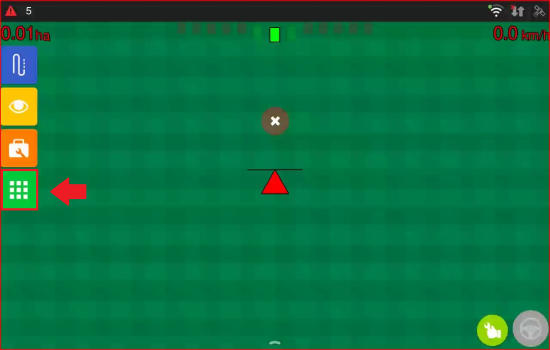
- On the operation screen, tap the Menu icon.
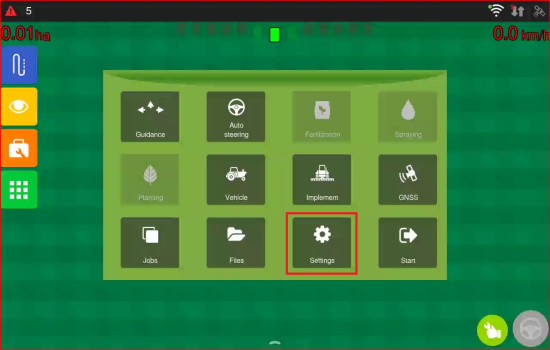
- Access Settings.
- Change the System Mode from Normal to Advanced by tapping the corresponding button.
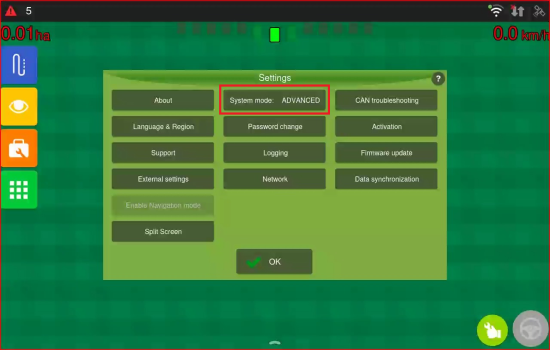
Done, the advanced features will now be visible and accessible throughout the system.
Enabled features
With Advanced Mode active, the operator has access to additional features and settings:
- Auto Turn: allows the Auto Steering to automatically calculate and execute the manoeuvres at the headland, precisely and consistently transitioning between guidance lines, significantly reducing the need for manual intervention by the operator. Find out more about this feature in this guide.
- Simulated Speed: allows simulating the vehicle speed for testing and calibration purposes, without the need for actual movement. Find out more about this feature in this article.
- Reference Reading Point: allows changing the implement's reading reference point, adjusting it according to the operation's needs. Check further details in this article.