Release Notes - Latest Version
21 Oct 2026
This is our latest software version! This release includes Hexagon’s newest features for agriculture.
Update Instructions
This release improves its guidance and performance. In all other cases, we recommend using our latest LTS version.
New Features
We added a new feature to improve performance.
Multiple Booms Control
-
Now, instead of controlling just one boom per implement, the system can control up to four booms. Each boom retains its own characteristics, such as the number of sections and channels, which can be configured individually.
Support for Cameras on Ti10
-
The Ti10 now supports live video from up to 4 cameras (wired or wireless) directly on screen, removing the need for additional monitors. Operators can view cameras one at a time, in a 4-camera grid, or side-by-side with their normal operation screens.
Customizable filter settings
-
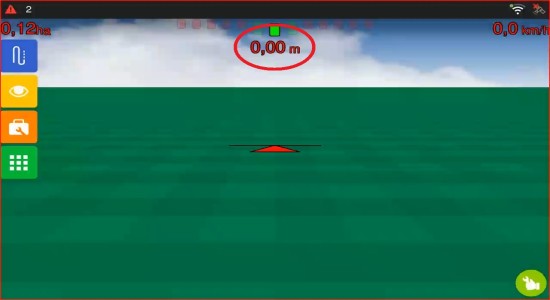
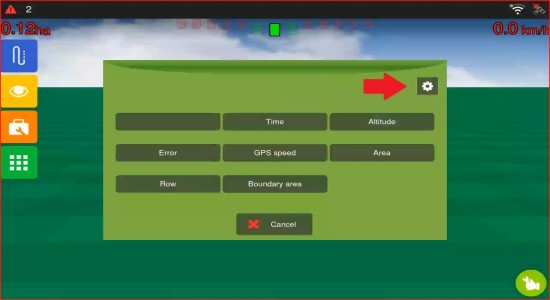
Adjust the filter and error tolerance for each indicator on the operation screen — such as sprayer rate and pressure, and subsoiler data — to balance more stable readings with greater sensitivity to changes in the field.
-
With the system mode set to ADVANCED, press the main indicator on the operation screen and tap the gear icon to access it.
Implement Control
-
Accurate coverage track for implements with alternating section patterns and multiple booms. You can now see the covered area on the operation screen correctly reflecting each section's actual position for ISOBUS implements with alternating, staggered, or discontinuous section arrangements across single or multiple booms.
-
Faster recommendation map selection with text search. You can now type to search and filter recommendation maps by name on the Sprayer, Fertilizer, and Planter panels — the selection screen shows only what your chosen application mode needs (Fix Rate, Map Fix Rate, or Variable Rate), and a map preview with area and dosage is available on demand.
New vehicle type available
-
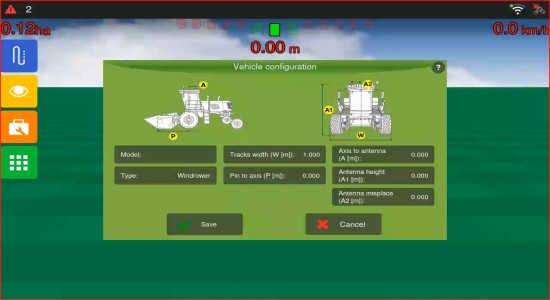
When setting up your machine, you can now select the Windrower as a vehicle type, using the same measurement inputs as track vehicles to configure the Auto Steering.
Manual Epoch control for precise positioning
-
You can now manually set or override the epoch for datums, ensuring accurate steering when the map epoch is missing or incorrect. This lets you correct positioning offsets caused by tectonic plate movement, especially for PPP users.
Anticipation editing
-
You can now adjust anticipation settings directly from the display even when the ISOBUS implement does not report a latency DDI in its DDOP.
Improvements:
This update also includes enhancements to existing features, increasing system reliability and improving operational efficiency.
Split Screen (Ti10)
-
You can now view multiple screens simultaneously — such as Operation, ISOBUS VT and Camera — on your Ti10 display without button overlaps or interface conflicts, even when using Remote Access or Sprayer controls.
Guidance Lines and Datum
-
Datum handling when creating new guidance lines:The system was updated to ensure the datum is set correctly for all guidance lines. This prevents position reference inconsistencies when creating new guidance data.
Implement control
-
When you swipe through the recommendation dock, the sections dock now updates automatically to match the selected boom or channel.
-
The new positioning engine improves the position calculation for each boom, taking into account its shape and connection type. As a result, section control and position tracking now work accurately across all arms of the implement, even on multiple booms configurations.
Performance
-
Performance improvement in Section Control: We optimized real-time calculation processing, reducing unnecessary resource usage and improving system efficiency during operation.
Rate control
-
You can now use the Auto Tuning with motors equipped with gearbox reduction, ensuring the calculated minimum and maximum operating speeds remain valid.
-
Auto Tuning for fertilisation control now works reliably at low rotation speeds, ensuring more accurate and consistent calibration across all operating conditions.
UI
-
The start-up screen on Ti5+ and Ti10 has been redesigned with the new Hexagon branding.

Expanded support for up to 128 sections
-
Implements with up to 128 sections are now compatible with automatic section control, enabling more precise application management with high-section-count equipment.
Bug Fixes
This release fixes important issues to increase system stability, operational safety, and reliability.
GNSS and Guidance
-
Automatic Turn correction: A behavior identified in some automatic maneuvers was fixed, where the steering wheel could turn on its own incorrectly when passing through a specific point on the guidance line. With this adjustment, the maneuver is now completed normally, without abrupt and unexpected direction changes in that section.
-
Fix for viewing and loading duplicate guidance maps: An issue was fixed where, when importing the same guidance map more than once, the duplicate copy might not appear correctly in the preview or load on the operation screen. With this fix, all imported maps — including duplicates — are now displayed correctly and load normally during operation.
Section Control
-
Headland section control has been redesigned to work consistently across all implement types and recommendation modes. Operators can now reliably enable or disable product application in the headland area, with the setting taking effect immediately.
-
Correct target rate display for multiple sections when working with ISOBUS implements. The reference rate widget on the dock shows the actual applied rate when one section closes on a two-section implement with equal recommendation rates, instead of incorrectly dropping to 0.
Known Issues
We identified some scenarios that may affect system behavior. We are working to resolve them and ensure an even better experience in the future
Auto Steering
-
For Automatic Maneuver, the use of the MPC trajectory controller is recommended; however, instability occurs when the MPC is used with SMART7.
Multiple Booms
-
Instability when changing the visible boom or editing a boom.
General
-
After reloading the project or changing the menu configuration, the reference lines may disappear from the screen. This is a purely visual issue, with no impact on machine control accuracy or positioning data. As a workaround, disable the guide and load it again. The team is already working on a permanent fix.
GNSS
-
Instability when using dual antennas.